

Account and billing
AI allowances and limits
How much AI each plan includes, what each allowance covers, when allowances reset, and what happens when you run out.
Each plan includes a set amount of each kind of AI work, called an allowance. On Free, most allowances are daily. On Plus they are monthly. On Pro they are unlimited, with fair-use limits to prevent abuse.
Allowances on each plan
| Allowance | Free | Plus | Pro |
|---|---|---|---|
| AI autocompletes | 10 a day | 3,000 a month | Unlimited |
| AI edits | 3 a day | 300 a month | Unlimited |
| AI chat messages | 5 a day | 300 a month | Unlimited |
| AI citation searches | 5 a day | 300 a month | Unlimited |
| Document reviews | 1 a month | 10 a month | Unlimited |
| Citation checks | 10 a day | Unlimited | Unlimited |
| Peer reviews | Not included | 5 a month | Unlimited |
| Literature reviews | Not included | Included | Unlimited |
For prices, see Plans and pricing.
When allowances reset
- Daily allowances reset at midnight UTC every day.
- Monthly allowances reset on the 1st of each month, at midnight UTC.
Monthly allowances follow the calendar month, not the day you subscribed. Midnight UTC may be a different time where you live, so the app tells you how long is left, for example “Used up · back in 5 hours” or “Used up · back on 1 November”.
What uses each allowance
| Allowance | Used by |
|---|---|
| AI autocompletes | Each autocomplete suggestion that appears, and each Draft a paragraph in Section briefs |
| AI edits | Each Rewrite of highlighted text |
| AI chat messages | Each message you send in AI Chat, including the home screen chat and chat edits, and Ask AI on an image (Write alt text, Suggest caption) |
| AI citation searches | Each search for sources for a highlighted sentence (Find sources for a sentence), and Ask in the Citation finder |
| Document reviews | Each Proofread, Claims or Tone review in Check my paper, and Also check the claims in the Citation checker |
| Citation checks | Each run of the Citation checker, and each Make citations live |
| Peer reviews | Each AI peer review |
| Literature reviews | Each literature review |
What never counts
- A request that fails, that you stop before anything arrives, or that comes back empty. You get that use back.
- An autocomplete that never appears on screen.
- Asking the same citation search again in the same tab (“Shown again, no AI citation search used”).
- Reading your assignment brief.
- Checking sources for a suggestion you accepted, when autocomplete finds a citation for it.
- Reviewing an empty document.
- Everything that isn’t AI: writing, citing with @, searching the Citation finder, your library, PDFs, every citation style, sharing and export.
Hourly limits
On top of the allowances, every plan has a limit on how many AI requests you can make in an hour. It stops runaway scripts and you’re unlikely to meet it while writing.
| Free | Plus | Pro | Your own key | |
|---|---|---|---|---|
| AI requests an hour | 40 | 200 | 600 | 600 |
If you reach it, you see “You have used the included allowance for this hour.” followed by how many minutes to wait.
See how much you have left
- Click your name at the top of the sidebar. The account menu shows your usage on your plan and when today’s allowances reset.
- Go to Settings, then Plan and usage. Under Your usage, each allowance shows what’s left, such as “7 left today”, “12 used today” or “Unlimited”. The bar turns amber at half used and red when nearly used up.
- Many features tell you as you use them, for example “4 of 5 AI citation searches left today”.
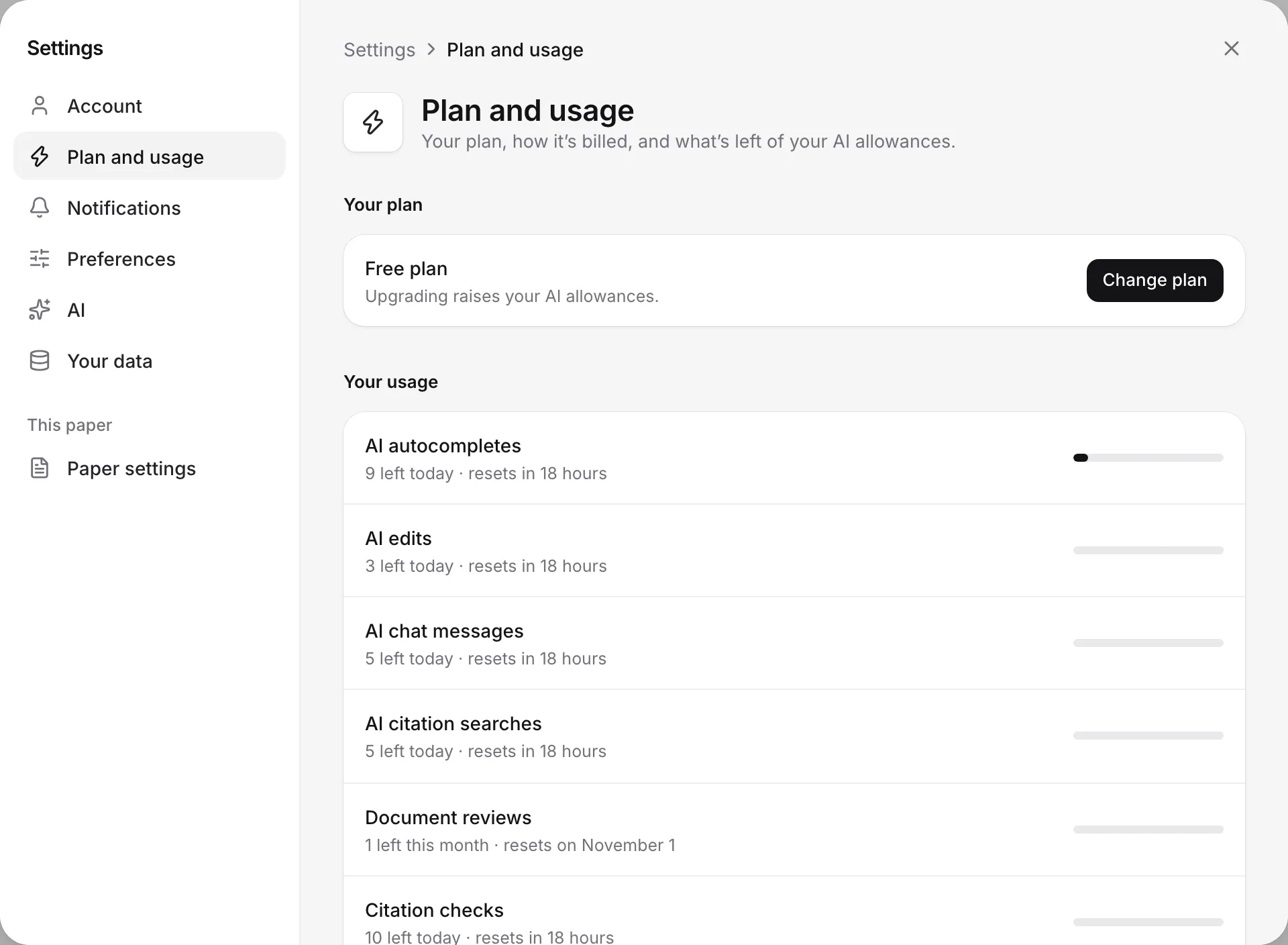
When you run out
You see a message that names the allowance and when it comes back. For example: “You’ve used today’s AI chat messages (5/5) on Free. It resets in 5 hours, or add your own API key in Settings.” A See pricing button opens the plans, with the allowance you used up marked.
Everything else keeps working. When autocomplete runs out, Writing Studio reminds you: “You can still type @ to search for sources and cite from your library.” When AI citation searches run out, titles, DOIs and search still work.
You have three ways to keep going:
- Wait for the reset.
- Upgrade your plan.
- Add your own AI key. AI features then stop using your allowances, except citation checks and the claim check in the Citation checker.
On Free, you may occasionally see “Writing Studio’s free-tier AI allowance is unusually busy right now.” Try again later, or add your own key to keep going straight away.
Fair use on Pro
Pro’s allowances are unlimited, with fair-use limits to prevent abuse. Literature reviews on Plus work the same way. Normal writing, even a full thesis, won’t reach them.
If you ever do, you see “You’ve reached this month’s fair-use limit” for that allowance. Email support@writingstudio.com and we’ll lift it.
Frequently asked questions
When do my allowances reset?
Daily allowances reset at midnight UTC. Monthly allowances reset on the 1st of each month at midnight UTC, whatever day you subscribed. The account menu shows how long until today's allowances reset.
Does a failed AI request use up my allowance?
No. If a request fails, you stop it before anything arrives, or it comes back empty, you get that use back. An autocomplete only counts when a suggestion actually appears.
What can I still do when an allowance runs out?
Everything that isn't AI keeps working: writing, citing with @, searching for sources, your library and export. You can wait for the reset, upgrade, or add your own AI key in Settings.
Why does it say I've reached the hourly limit?
Every plan has an hourly limit on AI requests: 40 on Free, 200 on Plus and 600 on Pro or on your own key. The message tells you how many minutes until you can carry on.
Was this page helpful?
Thanks for letting us know.