

Writing
Add a table
Insert a table, add or remove rows and columns, give it a caption, and turn its numbers into a chart.
Type /table and press Enter to add a table. It starts with three rows and three columns, and the top row is a header row.
Insert a table
- Put your cursor on an empty line.
- Type /table and press Enter, or click Insert in the toolbar and choose Table.
- Click a cell and start typing. Press Tab to move to the next cell.
Pressing Tab in the last cell adds a new row. To make a column wider or narrower, drag the line between two columns.
Add or delete rows and columns
- Click a cell next to where you want the change.
- Hover over the table and click the grip icon (Block actions) in the left margin.
- Choose what you need:
- Add row above or Add row below
- Add column left or Add column right
- Delete row or Delete column
- Header row on or off
New rows and columns go next to the cell your cursor is in.
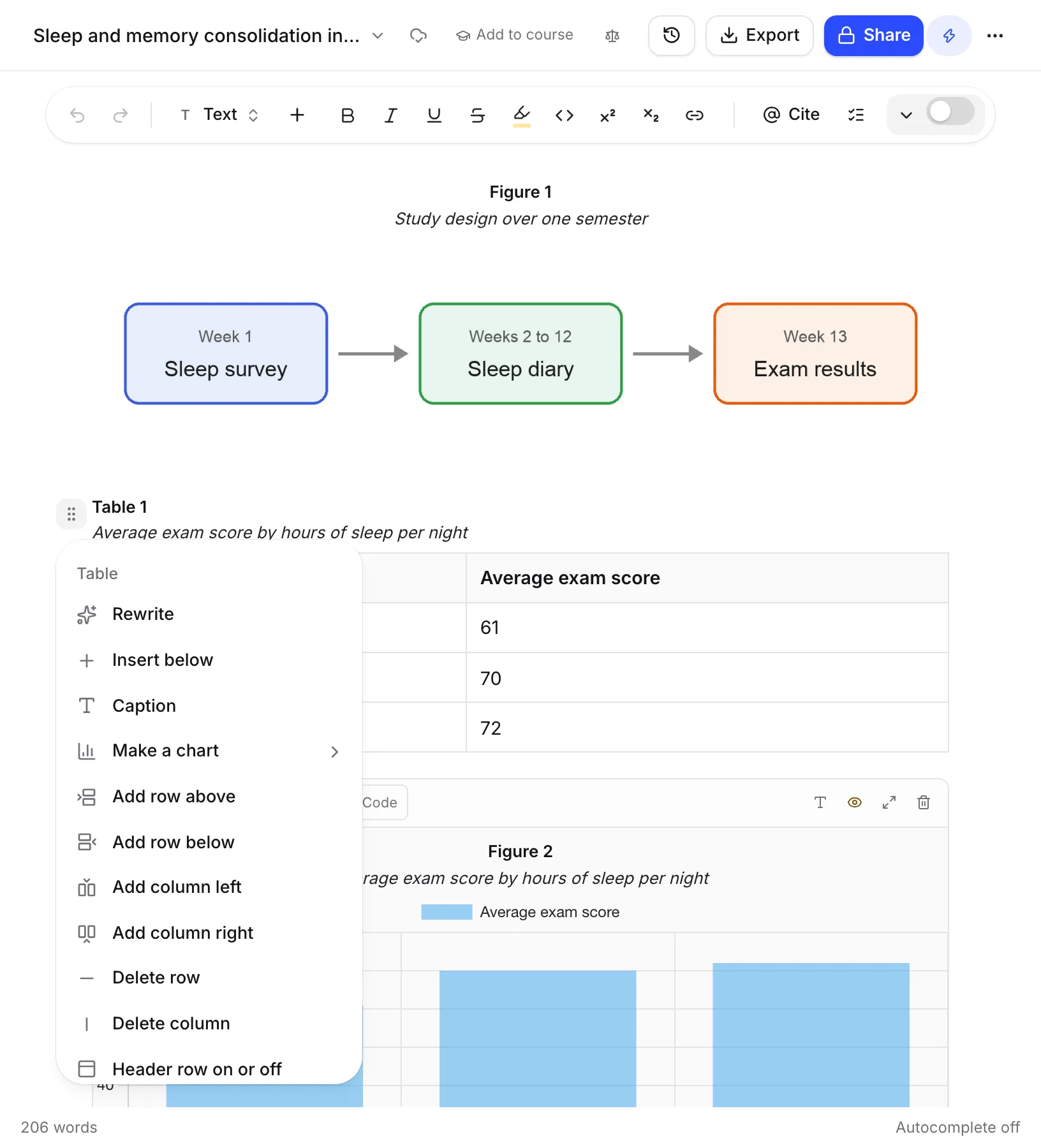
Add a caption
Open the Block actions menu and choose Caption, then type your caption. Table captions sit above the table.
If Number figures and tables is on, the caption starts with a label like “Table 1”, written the way your citation style asks. To point to a table from your text, see Number figures and refer to them.
Turn a table into a chart
You can draw a chart from a table’s numbers without writing any code. It doesn’t use AI.
- Open the table’s Block actions menu.
- Choose Make a chart.
- Pick Bar chart, Line chart or Pie chart.
The chart goes below the table. Writing Studio reads your table like this:
- The first column gives the labels.
- Each column of numbers becomes a series in the chart.
- It understands numbers written like 1,234, 45%, $3.50 and 12.3 (4.1).
The chart is drawn from the numbers as they are now. If you change the table later, make the chart again. If the table has no numbers yet, you’ll see “There are no numbers in this table yet. Type some in, then make the chart.”
To change the chart’s colours, labels or type afterwards, see Add diagrams, charts and code.
Tables on your phone
You can type in tables on a phone, but the Block actions menu is only on a computer. To add rows, columns or a caption, or to make a chart, open the paper on a computer.
Frequently asked questions
Does the chart update when I change the table?
No. Make a chart draws the chart from the table's numbers as they are at that moment. If you change the numbers later, delete the chart and make a new one.
Does Make a chart use AI?
No. The chart is built straight from the numbers in your table, so it doesn't use any of your AI allowance.
Why does my table say Table 1?
Tables are numbered for you when Number figures and tables is on, in the way your citation style asks. You can turn numbering off in Paper settings.
Was this page helpful?
Thanks for letting us know.