

Checking your paper
Write your AI use statement
If your course asks you to declare your AI use, Writing Studio drafts the statement from what you actually did in this paper. Check it, edit it and copy it.
If your course asks you to declare how you used AI, Writing Studio drafts the statement for you, from what you actually did in this paper. Check it, edit it if you need to, and copy it into your work.
Find your AI use statement
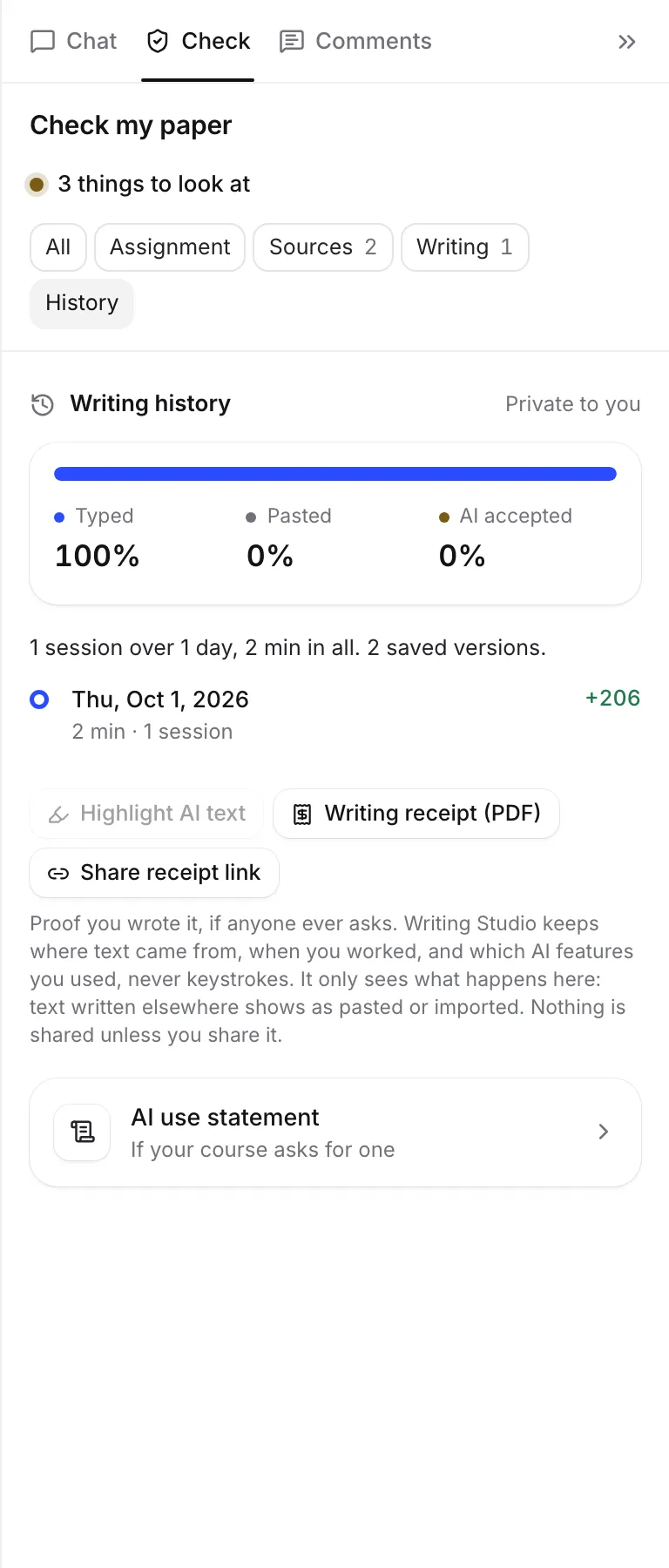
- Open the Check tab and click History at the top.
- Below your writing history, open the AI use statement card.
The card says “If your course asks for one”. Once you tell Writing Studio your course needs one, it says “Your course asks for one” (or “Your brief asks for one”) and opens by itself.
When you export a paper whose course asks for a statement, the Export dialog reminds you: “Your course asks for an AI use statement.” Click Get it to come straight here. See Export your paper.
Tell Writing Studio your course asks for one
Turn on My course asks for an AI use statement. If your assignment brief says you need one, reading the brief turns this on for you. See Read your assignment brief.
With it on:
- the statement opens by itself in Check
- Export reminds you to include it
- your writing receipt includes it
Choose a format
Pick Paragraph or Task list.
A paragraph reads something like:
I used Writing Studio, an AI research and writing tool, to find sources for my claims, format my citations and reference list, edit and proofread parts of my writing and draft some of the text. About 6% of the final text started as AI-generated text that I chose to accept. Every cited source links to its original record. The rest of the writing is my own.
A task list has a line for the title and the tool, then one line for each kind of use:
- Finding sources
- Formatting citations and references
- Asking questions and discussing ideas
- Feedback on my writing
- Editing and proofreading
- Drafting text
Each line says “used” (with how), or “not used”. If your AI rules didn’t allow something, it adds “(not allowed on this assignment)”. The list ends with the dates you used AI and a last line about the rest of the writing.
How the statement is written
Writing Studio writes it from your paper’s own record:
- the AI features you used on this paper
- the AI text still in your paper. The percentage matches your writing history.
- your AI rules. For a kind of help your rules don’t allow and you didn’t use, it can say so, like “My course’s AI rules for this assignment don’t allow AI for drafting text, and I didn’t use it for that.”
If you didn’t use any generative AI, it says “I did not use generative AI for any part of this work.”
The last sentence, “The rest of the writing is my own.”, is yours to confirm or change.
Edit and copy it
- Read the statement and change anything in the box.
- Click Copy statement. The button says Copied.
- Paste it where your course asks, usually at the end of your paper.
Your edits are kept with the paper. Undo my changes brings back the wording Writing Studio wrote.
If you keep writing after you edit it, you may see “Your writing history has changed since you edited this.” Check your wording is still right, or undo your changes for the up-to-date version.
If copying doesn’t work, select the text in the box and copy it by hand.
Check it before you submit
- It only knows what happened in Writing Studio. If you used other AI tools, add them yourself.
- Your course may ask for a set format or wording. Follow your course’s instructions.
- Only you can see it here. Nothing is sent to your instructor.
Frequently asked questions
Is the statement accurate?
It only says what your paper's record shows: the AI features you used, the AI text still in your paper, and your AI rules. Read it and change anything that doesn't match how you worked, before you copy it.
Does it include AI tools I used outside Writing Studio?
No. Writing Studio only knows what happened in it. Add any other tools you used yourself.
Who can see my AI use statement?
Only you, until you copy it into your paper or share a writing receipt that includes it.
Was this page helpful?
Thanks for letting us know.