

Citations
Search for papers with the Citation finder
Search about 250 million scholarly works by title, keywords, DOI or question, filter the results, and save what you find to your library.
The Citation finder searches about 250 million scholarly works by title, keywords, ID or question. Use it to save sources to your library while you research, or to cite them straight into your paper.
Open the Citation finder
- Click Citation finder in the left sidebar.
- Click Add in your library. Opened this way, it only saves.
- In a paper, type @ or click Cite in the toolbar. See Cite a source with @.
With a paper open, each result has Cite and Save. With no paper open, results only have Save, and what you save waits in your library until you cite it.
What you can type
The search box takes up to 300 characters:
- A DOI, PubMed ID, PMC ID, arXiv ID, ISBN or link. Finds that exact work.
- A full reference. Finds the real published record of a reference you copied.
- A title or keywords. Lists papers, best match first.
- A question. Offers an AI search that reads the papers and quotes what answers it.
A tag beside the box shows how your text was read: DOI, arXiv, PubMed, ISBN, Link, Reference, Question or Sentence.
What it searches
The finder searches OpenAlex, a free catalog of about 250 million scholarly works. If OpenAlex can’t be reached, it searches Crossref instead and says “Showing results from Crossref right now.”
Works that have no DOI and no link are left out, so every result can be traced back to its source. Sources already in your library show above the database results.
Filter and sort results
Click Filters to narrow the list:
- Published: Any year, Last 3 years, Last 5 years or Last 10 years. If your assignment brief asks for recent sources, there is also an option that follows your brief.
- Times cited: Any, 5+, 20+ or 50+.
- Include preprints: turn off to hide papers that are not peer reviewed yet.
- Journal articles only: hide books, chapters and other types.
- Order: Best match, Most cited or Newest.
The filters start from the paper’s Source rules in Paper settings, so you only set them once per paper.
You see 20 results at a time. Click Show more at the bottom of the list for the next 20.
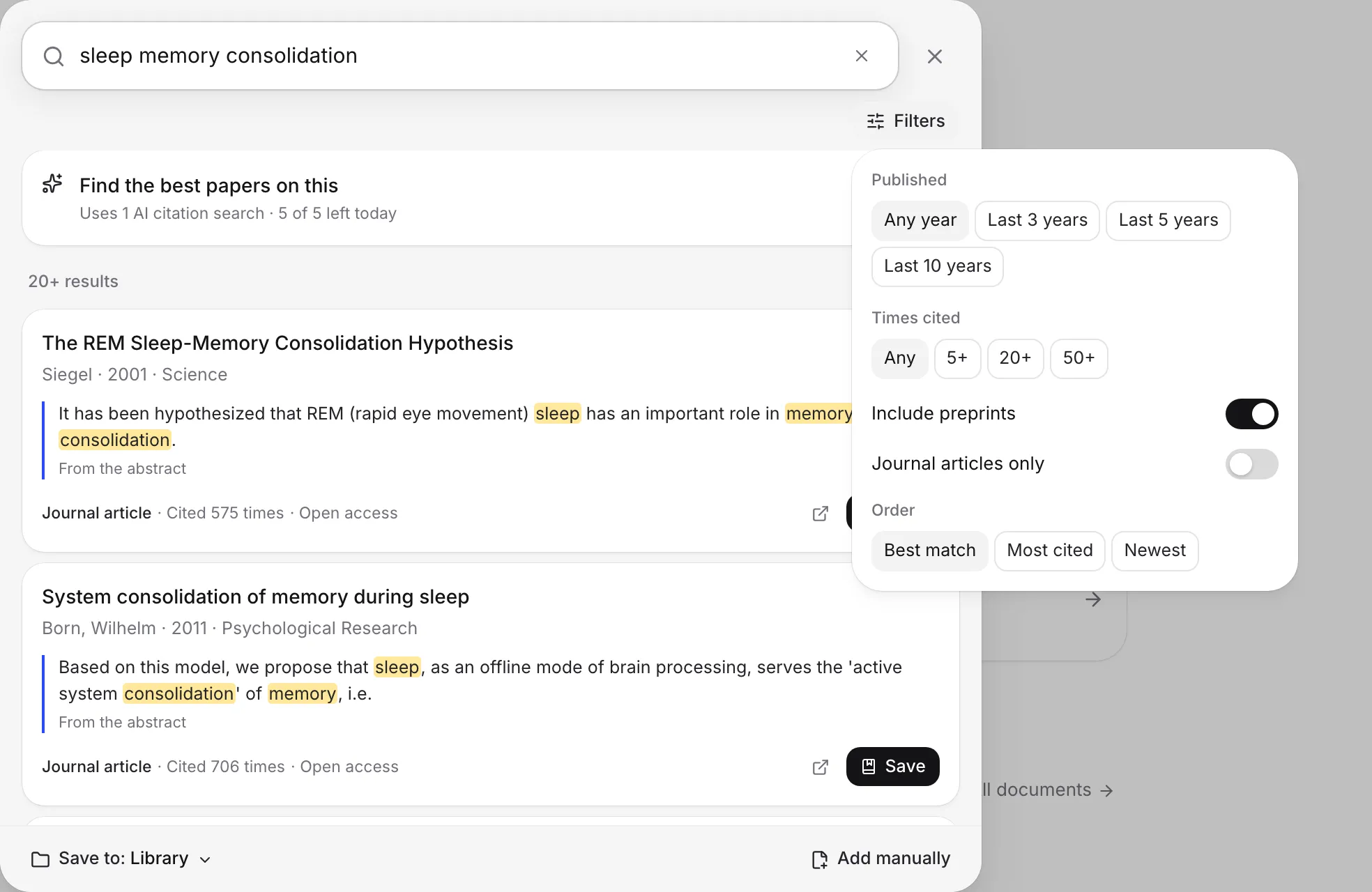
Save results to your library
- Click Save on a result. It changes to Saved.
- Use the Save to menu at the bottom to choose where saved sources go: Library only, a course, a collection, New course… or New collection….
- After a save, a message says “Saved to” and the place, with Change to pick another one.
A work you already have is never saved twice. If it has the same DOI, or the same title, first author and year, the finder uses your existing copy.
Ask a question with AI
Type a question, such as “does sleep improve memory in older adults”, and the finder offers Find papers that answer this. Choose it, or press ⌘Enter (Ctrl+Enter on Windows). The AI reads up to 14 papers and shows the ones that answer you, each with the passage it quotes. Click Save all to keep them all.
Each Ask uses 1 AI citation search (5 a day on Free, 300 a month on Plus, unlimited on Pro). Asking the same thing again in the same finder is free. See AI allowances and limits.
When nothing is found
If the finder says “Nothing found for that.”, try the exact title, a DOI, or ask it as a question. You can also choose Add it manually (or Add it as written for a pasted reference) to enter the details yourself. See Add a source by hand or a placeholder.
Other messages:
- “Couldn’t reach search. Check your connection.” Check your internet, then choose Try again.
- “Too many searches in a short time. Try again in a minute.” Wait a moment and search again.
Use it with the keyboard
- ↑ and ↓ choose a result.
- Enter cites the chosen result, or saves it when there is no paper to cite into. If you haven’t chosen one, Enter acts on the exact match, or runs Ask when you typed a question.
- ⌘Enter (Ctrl+Enter) runs Ask.
- Esc closes the finder.
On a phone, the finder opens full screen. Tap Cancel to close it.
Frequently asked questions
Is there a limit on how many searches I can do?
No. Searching, looking up DOIs and other IDs, saving and citing are free and unmetered on every plan. Only the AI Ask option uses your AI citation searches.
Why doesn't a paper I know about show up?
Try its exact title or paste its DOI. Works with no DOI and no link are left out of results, so you can always check what you cite. If it still isn't found, add it by hand.
What does the Citation finder search?
OpenAlex, a catalog of about 250 million scholarly works. If OpenAlex can't be reached, it searches Crossref instead and tells you so.
Was this page helpful?
Thanks for letting us know.