

Citations
Add a source by hand or a placeholder
Type in a source's details when search can't find it, or leave a [citation needed] marker and fill it in later.
If search can’t find a source, you can type its details in yourself. If you haven’t found a source yet, leave a placeholder that reads [citation needed] and come back to it later.
Add a source by hand
- Type @ in your paper to open the Citation finder.
- Choose Add manually at the bottom of the finder. If a search found nothing, you can also choose Add it manually there, or Add it as written when you pasted a full reference.
- Fill in the form. Title is the only field you must fill in.
- Choose Save and cite.
The source is saved to your library and cited at your cursor. If you opened the finder from your library rather than a paper, the button reads Save to library instead.
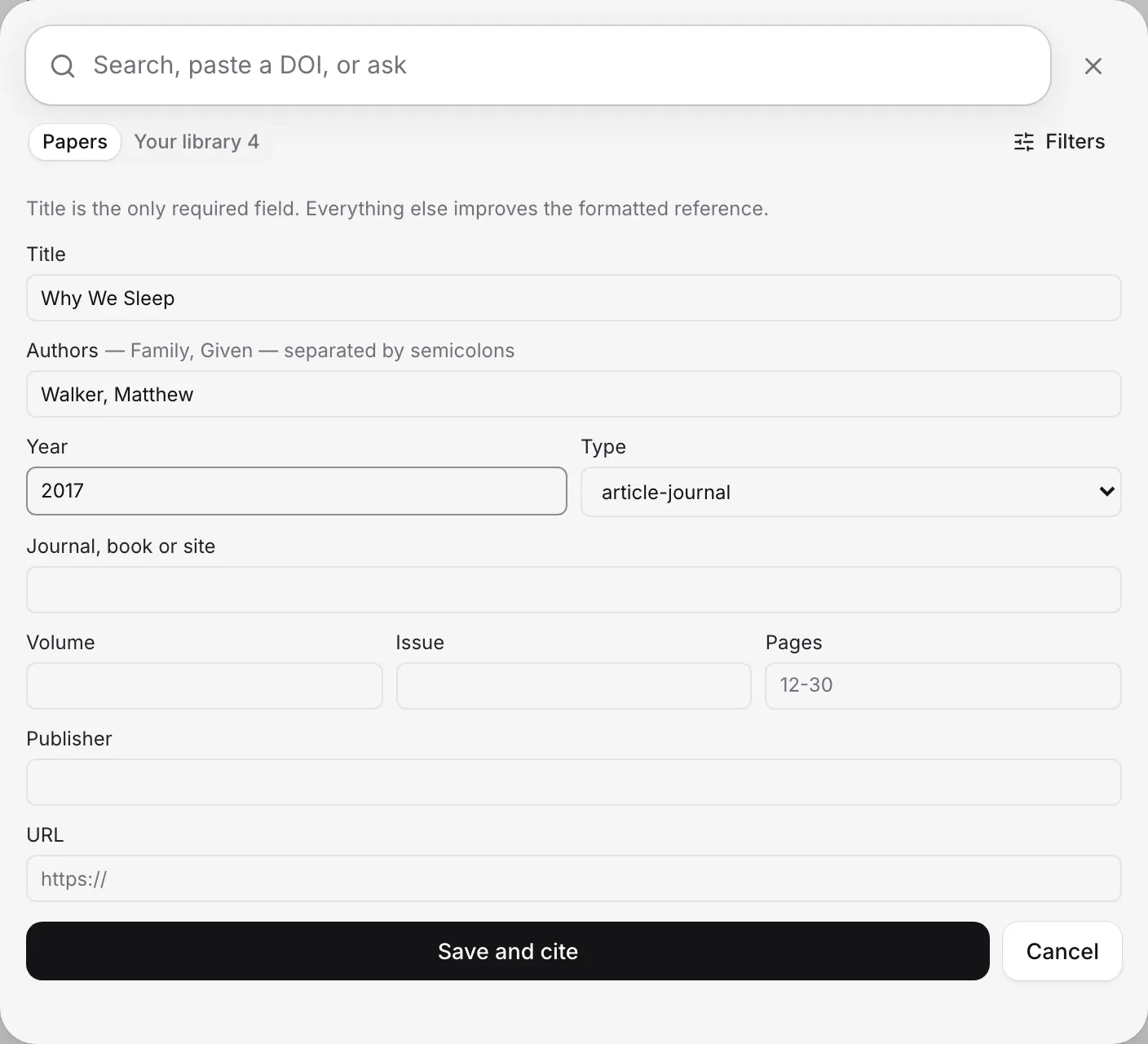
Fill in the form
Everything except the title is optional, but each detail makes the formatted reference more complete:
- Authors: family name, then given name, with a semicolon between people. For example: Smith, Jane; Okafor, Chidi.
- Year.
- Type: such as a journal article, book, chapter, report, thesis, dataset or web page.
- Journal, book or site.
- Volume, Issue and Pages.
- Publisher.
- URL: a web address where readers can find it.
Add a URL if there is one. Without a DOI, a link or an uploaded file, the citation shows in orange, because readers have no way to check the source. You can add a DOI or attach the PDF later, from the source’s page in your library. See Edit a source’s details.
Leave a placeholder for now
When you know you need a citation but haven’t found the source yet:
- Type @ where the citation should go.
- Choose Placeholder for now at the bottom of the Citation finder.
A [citation needed] marker goes into your text. It doesn’t add anything to your reference list.
Autocomplete can leave these markers too, when a sentence it wrote states a fact and no published paper backs it up.
Replace a placeholder with a real source
- Click the [citation needed] marker.
- Choose Find a source.
- Find the source in the Citation finder and choose Cite.
The source you choose takes the marker’s place. To delete the marker instead, choose Remove.
Frequently asked questions
Which details do I need to add a source by hand?
Only the title. Authors, year, type, journal, volume, issue, pages, publisher and a link all make the formatted reference more complete, so add what you have.
Will placeholders show up when I submit?
A placeholder reads [citation needed] in your paper until you replace it. Check my paper lists every unresolved placeholder, so you can fill them in before you submit.
Why is my hand-added citation orange?
A source with no DOI, link or file can't be checked by readers. Add a DOI in the source's details, or attach the PDF, and the orange goes away.
Was this page helpful?
Thanks for letting us know.