

Writing
Write equations
Add maths to your paper in LaTeX, either inside a sentence or on its own line, with a live preview.
Type $$x^2$$ to add maths inside a sentence, or type /equation to add an equation on its own line. Equations are written in LaTeX, and you see a live preview as you type.
Add an equation inside a sentence
An inline equation sits in your text, like this: the area is πr².
- Type your LaTeX between two pairs of dollar signs, like
$$E = mc^2$$. It turns into an equation when you type the last$$. - Or type /inline and choose Inline equation.
Add an equation on its own line
A display equation is centred on its own line, for longer formulas.
- Type /equation and choose Equation.
- Or click Insert in the toolbar and choose Equation.
- Or type your LaTeX between three dollar signs on each side, like
$$$\sum_{i=1}^{n} x_i$$$.
Edit an equation
- Click the equation, or select it and press Enter. The Edit equation box opens.
- Type your LaTeX in the box that says “In LaTeX, like \frac{a}{b}”. The preview updates as you type.
- Click Save, or press ⌘Enter (Ctrl+Enter on Windows).
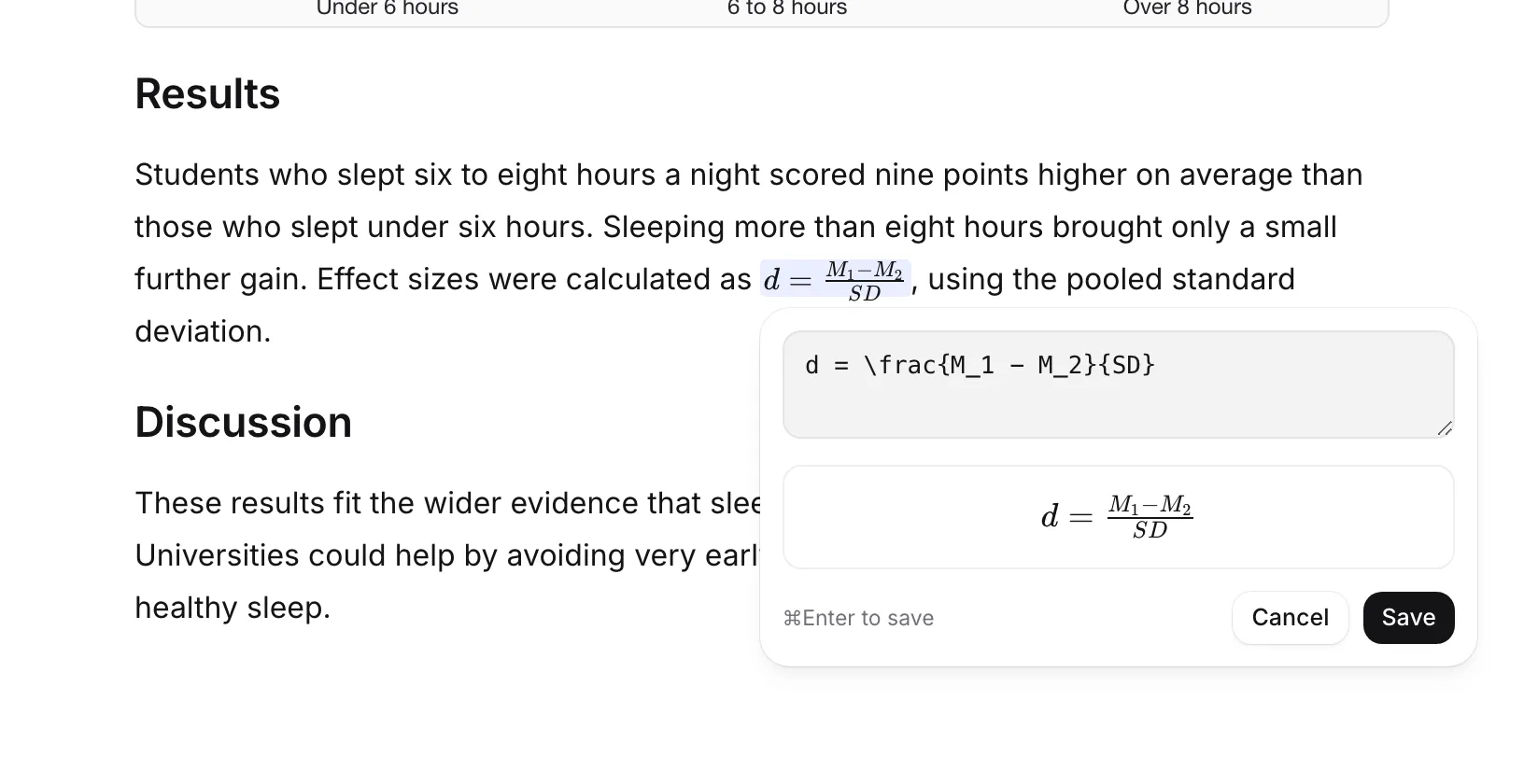
To leave without saving, click Cancel or press Esc. If you press Esc on a new equation that’s still empty, it’s removed. Clicking outside the box saves your changes.
Fix an error
If your LaTeX has a mistake, the box tells you what’s wrong in plain words. For example, “A { has no } to close it.” Fix it and the preview comes back.
A few LaTeX basics:
| Type | To get |
|---|---|
x^2 |
x squared |
x_i |
x with a small i below |
\frac{a}{b} |
a over b |
\sqrt{x} |
square root of x |
\alpha, \beta, \pi |
Greek letters |
\sum_{i=1}^{n} |
a sum from 1 to n |
Equations in your exports
Equations come through in every export. Word files get real Word equations you can edit in Word, and LaTeX files keep your code as it is, ready for Overleaf. See Export your paper.
Frequently asked questions
Do I need to know LaTeX?
A little. Equations are written in LaTeX, like \frac{a}{b} for a fraction. The live preview shows the result as you type, and errors are explained in plain words.
Do equations come through when I export?
Yes. Word exports keep them as real Word equations, and LaTeX exports keep your LaTeX code. They also show in PDF and web page exports.
How do I edit an equation I already added?
Click it, or select it and press Enter. The Edit equation box opens with its LaTeX code.
Was this page helpful?
Thanks for letting us know.