

Citations
Check a reference list with the Citation checker
Paste or upload any reference list or paper, and the Citation checker looks up every reference, flags fake, wrong or retracted ones, and fixes them.
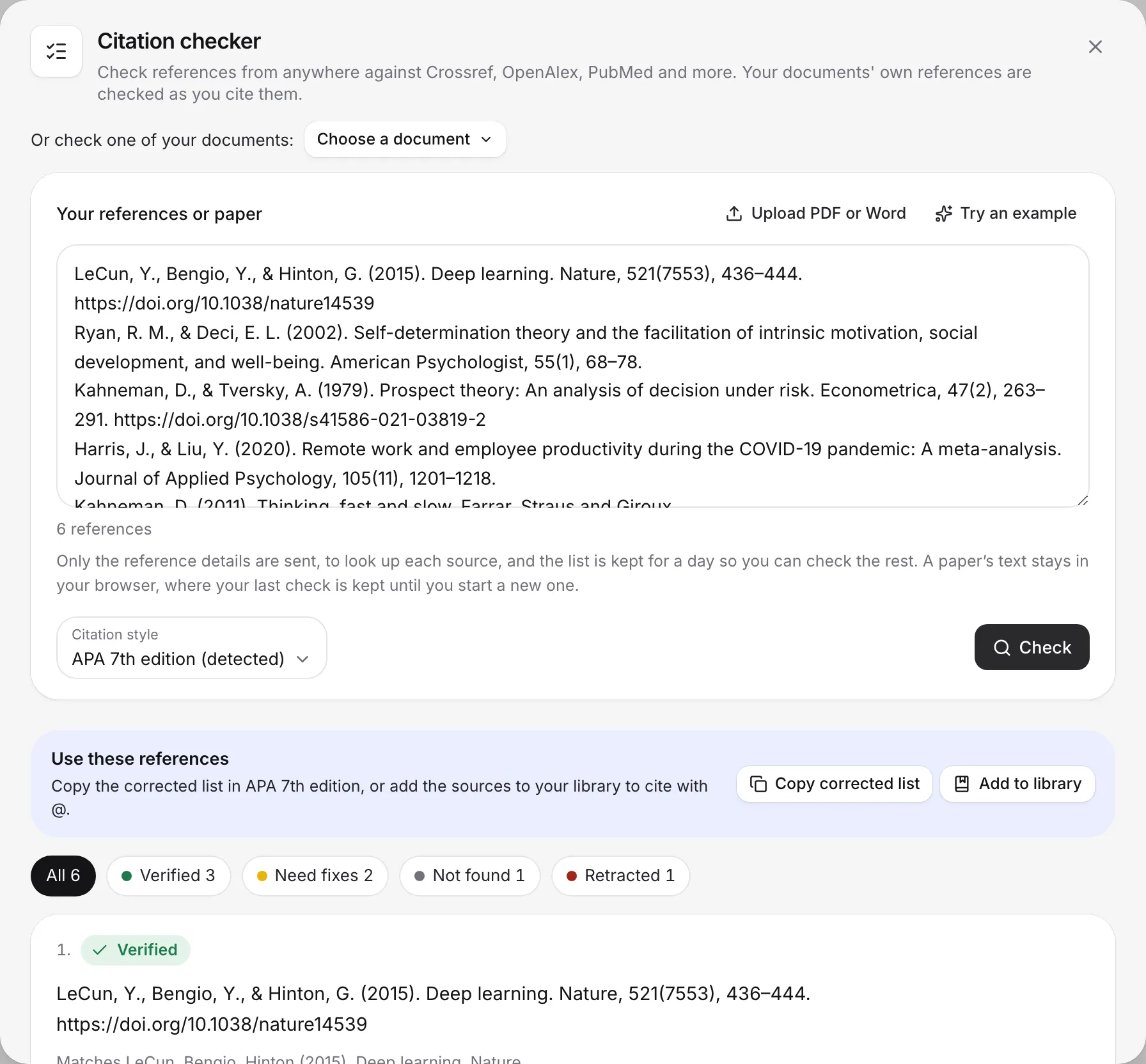
The Citation checker checks references written anywhere: a full reference list, a single citation, or a whole paper. It looks up each reference in Crossref, OpenAlex, PubMed and other databases, and tells you which are verified, which have wrong details, which can’t be found and which were retracted.
Papers you write in Writing Studio don’t need it: their references are checked for you as you cite them. See Check your references.
Run a check
- Click Citation checker in the left sidebar.
- Add what you want to check, in one of these ways:
- Paste a reference list, a single citation, or a whole paper with its references.
- Choose Upload PDF or Word, or drop a PDF or .docx file on the box.
- Under “Or check one of your documents”, choose one of your papers.
- Choose Try an example to see how it works.
- Leave the style on Detect automatically, or pick the style your list uses.
- Choose Check, or press ⌘Enter (Ctrl+Enter on Windows).
The checker works with APA, MLA, Chicago, Harvard, IEEE, Vancouver and more. While it runs, you can close it and keep writing. Writing Studio tells you when it’s ready.
Read the results
Each reference gets one of these results:
- Verified: it matches its published record.
- Details don’t match: the year, title, authors or other details differ from the record. Choose Fix (or Use this version) to use the corrected reference.
- Couldn’t find this source: it wasn’t found in the databases. It may have a typo, or it may not exist. Choose Find a real source to search for the real one, or Search again.
- Retracted: the paper was withdrawn. Choose Find a replacement.
- Couldn’t check right now: the databases couldn’t be reached. Choose Check again.
If the checker matched the wrong paper, choose Not the right match? to pick another one.
Use the filters at the top (All, Verified, Need fixes, Not found and Retracted) to see one group at a time. When it’s done, a line sums up the check, for example “Done. 18 verified, 2 need fixes, 1 not found, 0 retracted.”
Check citations inside a paper
When you check a whole paper, the checker also matches each in-text citation to the reference list and flags:
- No matching reference: a citation with no entry in the list.
- Year doesn’t match or Name doesn’t match between the citation and its entry.
- Unclear which reference: it could be more than one entry.
- Numbered out of order: for numbered styles.
- Not cited in your paper: an entry nothing cites.
Check claims against their sources
Turn on Also check the claims to compare each sentence that cites a source with that source’s abstract, using AI. Each sentence gets a verdict:
- Supports or Partly supports.
- Doesn’t address this or Abstract says otherwise.
- Can’t tell from the abstract or No abstract to check.
It checks up to 40 claims at a time. A claim check counts as 1 document review (1 a month on Free, 10 a month on Plus, unlimited on Pro), even when you use your own AI key.
Use the corrected references
When the check is done, you can:
- Copy corrected list: copy the fixed list, formatted for Word or Google Docs.
- Add to library: save the found sources to your library, so you can cite them with @.
- Import as a document: bring a pasted or uploaded paper into Writing Studio as a new document, with its references in your library and its citations live.
If you checked one of your own documents, you can also:
- Replace the list: swap the typed reference list in your document for the corrected one.
- Make citations live: link each typed citation to its source. See Turn typed citations into live ones.
Limits
| Free | Plus | Pro | |
|---|---|---|---|
| Citation checks | 10 a day | Unlimited | Unlimited |
| References per check | 50 | 150 | 150 |
| Claim checks (document reviews) | 1 a month | 10 a month | Unlimited |
- Papers can be up to 40,000 words. For a longer paper, paste just its reference list.
- Files can be PDF or Word .docx, up to 40 MB, and the first 300 pages are read. Old .doc files aren’t supported, and a scanned PDF has no text to read.
- If a list is longer than your limit per check, choose Check the rest when the first part is done.
Your own AI key doesn’t lift the citation check limit. When you run out on Free, the message says when your checks reset, with See plans to upgrade. See AI allowances and limits.
What is sent
Only the reference details are sent, to look up each source, and the list is kept for a day so you can check the rest. A paper’s text stays in your browser. With Also check the claims on, the sentences that cite a source are compared with the abstracts by AI.
Frequently asked questions
How many citation checks do I get?
Free includes 10 citation checks a day. Plus and Pro have unlimited citation checks. Your own AI key doesn't change this.
Can it check a PDF or Word file?
Yes. Upload a PDF or Word .docx file up to 40 MB. It reads the first 300 pages. Old .doc files and scanned PDFs with no text can't be read, so paste the text instead.
How many references can it check at once?
Up to 50 references per check on Free, and 150 on Plus and Pro. If your list is longer, choose Check the rest when the first part is done.
Is my paper sent anywhere?
Only the reference details are sent, to look up each source. A paper's text stays in your browser, unless you turn on Also check the claims, which reads the sentences that cite a source.
Was this page helpful?
Thanks for letting us know.