

Checking your paper
See your writing history
Writing history shows where the text in your paper came from, when you worked on it and which AI features you used. It never records keystrokes.
Writing history shows where the text in your paper came from, when you worked on it, and which AI features you used. It is proof you wrote your paper, if anyone ever asks. It never records keystrokes, and it is private until you choose to share it.
Open your writing history
- Open the Check tab in the panel on the right. On your phone, tap ⋯ and then Check my paper.
- Click History at the top.
The Writing history section is marked “Private to you”.
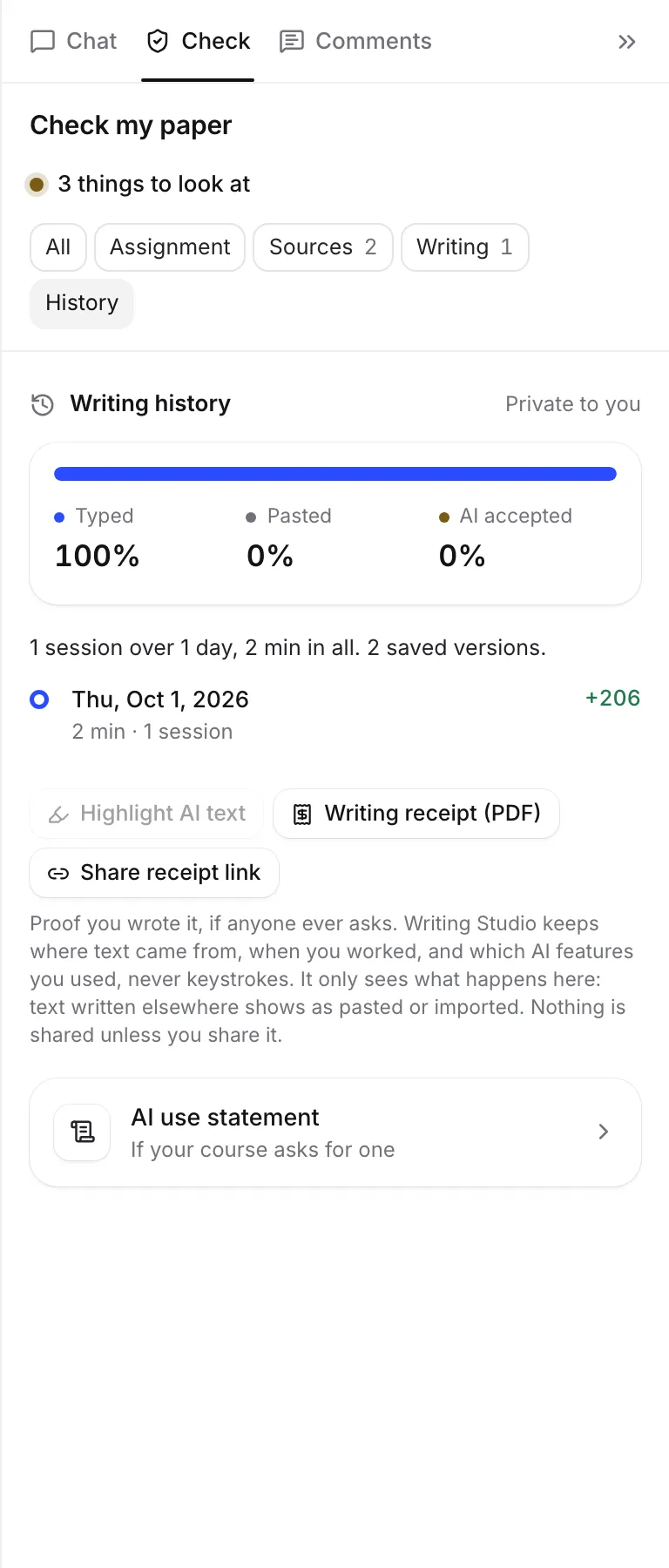
Where your text came from
A coloured bar splits your paper’s text into:
- Typed: written in Writing Studio.
- Pasted: pasted or dropped in from outside Writing Studio.
- Imported: from the Word file the paper was started from, with the date it came in. This only shows if you started from a Word file.
- AI accepted: AI text you chose to accept and that is still in your paper.
Under the bar, AI text is broken down by where it came from, like “8% from inline suggestions”, “AI rewrites”, “the AI chat” or “the literature review tool”.
A few things to know about how this is measured:
- Writing Studio only sees what happens in it. Text you wrote somewhere else, even your own, shows as pasted or imported.
- AI text that you later rewrite by hand no longer counts as AI.
- AI text you delete is no longer counted.
- On a paper you write with other people, Typed includes everyone’s typing. Check shows “Group paper: typed text includes co-writers”.
See which text came from AI
Click Highlight AI text to mark every AI passage in your paper. Click Hide AI text to turn it off. This is a good way to find AI text you want to rewrite in your own words.
When you worked
Below the bar, a line sums up your sessions, like “12 sessions over 5 days, 6 h 40 min in all. 85 saved versions.”
- A session is a stretch of writing. Time is counted from your edits, not from having the tab open.
- A gap of more than 20 minutes starts a new session.
- Only the times and word counts are kept.
The timeline lists your recent days, newest first, with the time spent, the number of sessions and the words added or removed. Click a day to open Version history at the copy that day ended with.
AI features you used
A line lists the AI features used on this paper and how many times, for example “AI features used: Cite (finding sources for a sentence) (3); AI rewrites of selected passages (2).” This includes features that don’t leave text in your paper, like chat questions and reviews.
What Writing Studio records, and what it doesn’t
Writing Studio keeps:
- where each part of the text came from (typed, pasted, imported or AI)
- when you worked: session times and word counts
- which AI features you used, and how often
It never records keystrokes, your screen, or anything outside Writing Studio. Nothing is shared unless you share it. Writing Studio doesn’t use your writing to train AI models.
Writing Studio doesn’t check whether text was written by AI somewhere else. A connection to GPTZero is not available yet.
Share it if you are asked
If someone asks how you wrote your paper, you can share this record without sharing the paper itself:
- Share a writing receipt as a PDF or a view-only link.
- Write your AI use statement from the same record.
Frequently asked questions
Does Writing Studio record my keystrokes?
No. It keeps where text came from, when you worked, and which AI features you used. It never records keystrokes or your screen.
Can Writing Studio tell if I pasted AI text from another tool?
No. It only sees what happens in Writing Studio. Text written anywhere else, by you or by another tool, shows as pasted or imported. Writing Studio doesn't run AI detection.
Does my instructor see my writing history?
Not unless you share it. Writing Studio doesn't send it to anyone. You decide whether to download a receipt or share a receipt link.
If I rewrite AI text, does it still count as AI?
No. AI text that you later rewrite by hand no longer counts as AI. It is your sentence then.
Was this page helpful?
Thanks for letting us know.