

Guides
Plan and write a literature review
Go from a topic to a literature review you can stand behind: narrow the question, build the reading list, draft it, check every claim and make it your own.
A literature review is not a list of papers. It is an argument about what the research says: where studies agree, where they disagree, and what nobody has answered yet. This guide takes one review, on how sleep affects memory and exam performance in university students, from a vague topic to a draft you can stand behind. You can do all of it by hand, and on Plus or Pro the Literature review tool can do the first pass for you.
Two routes, the same checks
The tool plans a set of searches, reads the papers it finds, writes a review from the ones it can quote, and checks every cited sentence against its source. It saves you the first rounds of searching and skimming. It does not save you the checking, because a review you didn’t verify is one you can’t defend.
By hand, you search, save, read and write. It takes longer, and you know the material better at the end. A good mix is the tool for a map of the field, then your own reading for the papers that matter.
Both routes end the same way: you check every claim, then you rewrite in your own voice. The steps below say where the routes split.
Narrow the question before you search
“Sleep and memory” is a topic. A review needs a question. Say what you want to know, who it is about and, if it helps, what kind of evidence counts: “How does sleep affect memory and exam performance in university students?” is a question you can answer. It also stops the review turning into a summary of everything ever written about sleep.
If your assignment sets limits, such as a number of sources or a date range, read them into the paper first so the checklist tracks them. See Read your assignment brief.
A wide topic gives thin results, and a very narrow one may find too little. If the tool says “We couldn’t find strong sources for this topic”, reword it with broader terms or widen the years.
Put what you already have in your library
Before you run anything, save the papers you already know matter: the ones from your reading list, or a paper your instructor named. Use Add in the library for a title or DOI, or Upload PDF for a file. See Add sources to your library.
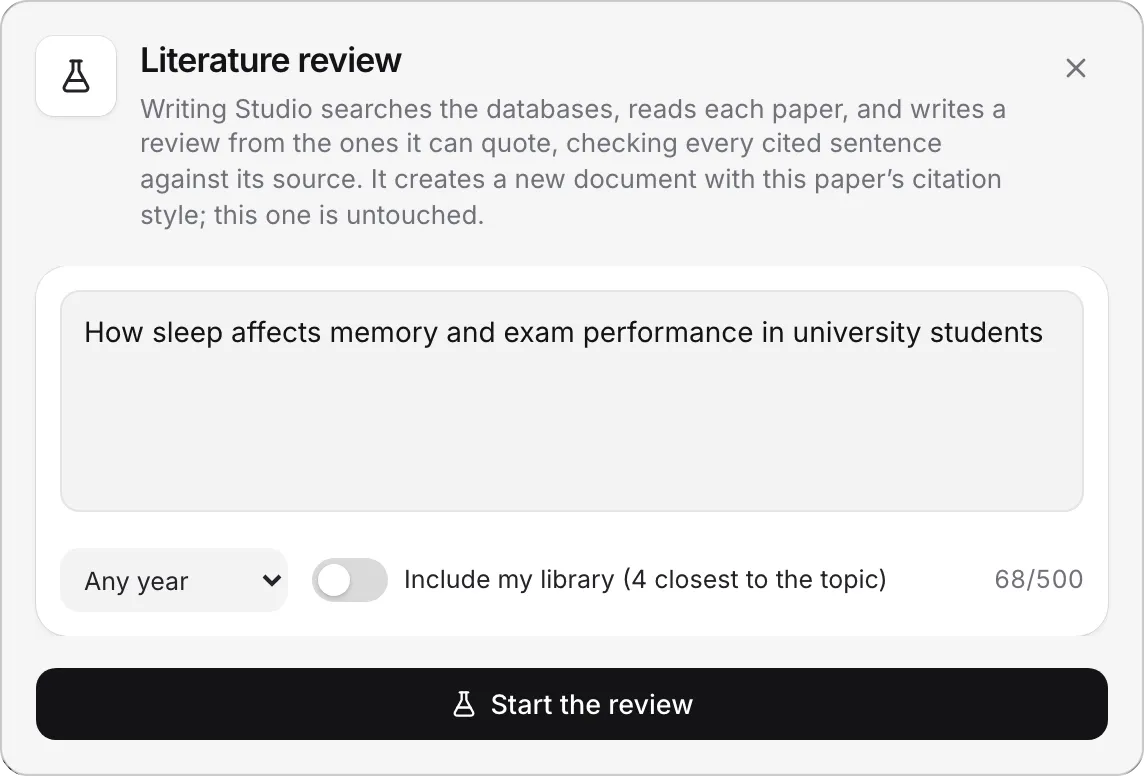
This matters for the tool, because Include my library sends it up to 20 of your sources, so it builds on papers you have already chosen. If your paper is in a course, those are the course’s sources, closest to your topic first. Otherwise they are the sources in your whole library that are closest to the topic. The tool reads each one by its abstract and the start of its PDF, so a source with neither can’t be used. It is off until you switch it on.
Run the tool, or build the list by hand
With the Literature review tool
Open Literature review in the sidebar, type your question (up to 500 characters), choose the years to search, decide whether to include your library, and click Start the review. It usually takes a few minutes. You can close the window and keep writing, and Writing Studio tells you when it is ready.
When it finishes, Open the review. The review is a new paper in the same course, in your citation style. The paper you started from is untouched. The window also lists two things worth keeping:
- Papers it read shows each paper the review used, with the ones it cited ticked. The rest have a Save button, which is a free reading list for the next step.
- Gaps and next questions is the tool’s view of what the papers leave open. It is a good start for your own conclusion.
If it stops part way, Open as a paper keeps what it wrote. See Write a literature review for plans and limits.
By hand
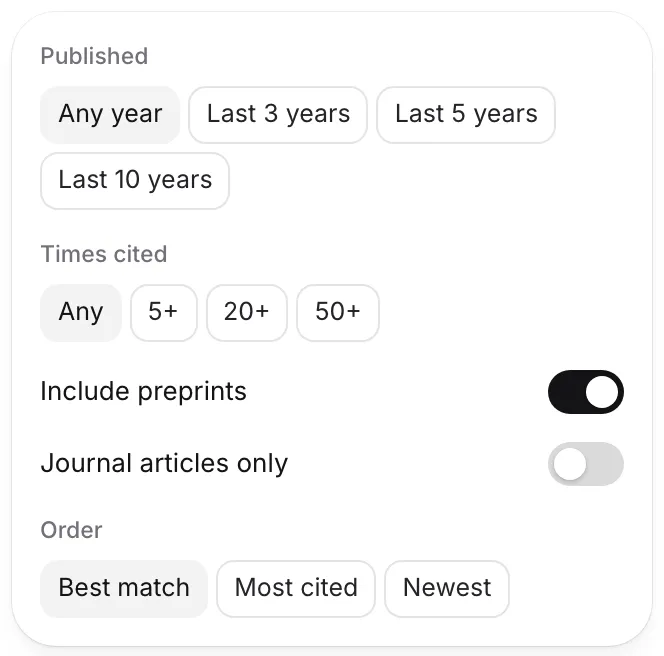
Search with the Citation finder and use its filters: journal articles only, a minimum number of citations, newest first or most cited first. Open the finder with a theme each time, not the whole question: “slow-wave sleep memory consolidation”, then “sleep deprivation exam performance students”, then “sleep intervention university”. Save what looks relevant to a collection named for the theme, so your library is already grouped the way your review will be. See Organize sources with collections and filters.
When you have a claim you want to support, highlight the sentence and use Cite to find sources that back it, with the passage that supports it. Each search uses one AI citation search from your allowance. See Find sources for a sentence.
Read the papers that matter
Whatever route you took, read the key papers yourself. Open each in the PDF reader, and use Keep or Quote & cite on the passages you will use. A review is judged on whether you understand the studies, and a model’s summary of a paper is not understanding. See Read PDFs and keep quotes.
Check the draft against its sources
Treat anything a tool wrote as a first draft, and check three things.
First, run Check my paper and look under Sources. In a literature review, Cited but not read will list many papers, because you cited a lot. That is Check doing its job. Attach the PDFs for the ones your argument leans on, and use Get the free PDF on a source’s page for the open-access ones. See Check your paper before you submit.
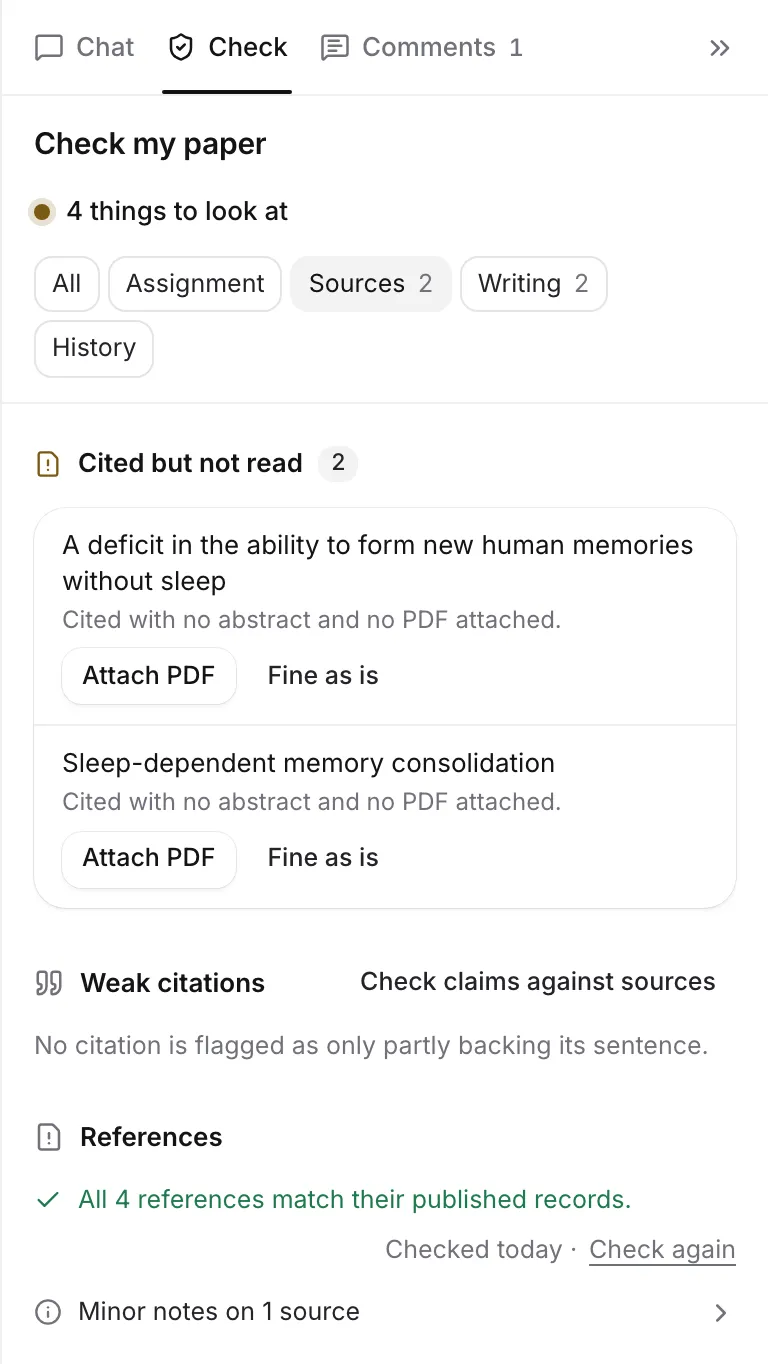
Second, check the references. Every cited source is compared with its published record, so a retracted paper or a mismatched detail is flagged. See Check your references.
Third, check each claim. The Claims review compares every cited sentence with the abstract of its source and flags the ones the abstract doesn’t support. It reads the abstract only, so open the PDF on anything it flags. It uses document reviews, and a long paper is read in parts that each count as one. See Proofread and review your paper.
Make it yours
A strong review is organised by theme, not by paper. Rearrange the draft under headings that match your themes, such as how sleep consolidates memory, what happens when students lose sleep, and what has been tried. Add your own paragraphs: where studies disagree and why, which have weak samples, and what the gap means for your question. Use Rewrite on sentences that don’t sound like you. See Rewrite highlighted text.
Keep the record honest
Text from the Literature review tool counts as AI text in your writing history, under “the literature review tool”, and an AI use statement lists it as drafting. The tool doesn’t check your AI rules, so that check is yours. If your course allows AI for finding sources but not for drafting, use the tool for its Papers it read list and Gaps and next questions and write the review yourself. Your reading list is the valuable part.
Frequently asked questions
Can I do this on the Free plan?
Yes, by hand. The Literature review tool comes with Plus and Pro, or with your own AI key. Searching, saving, reading and citing are free on every plan, and they are most of the work.
Is a review from the tool ready to hand in?
No. Treat it as a first draft that cites real papers. You still need to read the key sources, check each claim, add your own synthesis and make it sound like you.
Does the tool follow my AI rules?
No. The Literature review tool does not check the AI rules of the paper you start it from. If your course doesn't allow AI drafting, don't use text from it.
Was this page helpful?
Thanks for letting us know.